
GA4 Is Hiding Your AI Traffic. Here's How to See It (With or Without ezStats)
Open your GA4 property right now and look for ChatGPT traffic. You won't find a channel for it. Visits from chatgpt.com, perplexity.ai, and claude.ai are sitting inside your Referral channel, mixed in with every blog that ever linked to you.
That's a real blind spot in 2026. On sites we measure, AI assistants already account for a meaningful slice of search-style traffic; on one B2B site on our platform, 8% of classified search traffic came from AI platforms in the first half of 2026 (ChatGPT alone sent 90 sessions, with Copilot, Perplexity, and Claude behind it). Small numbers today, but it's the fastest-growing channel on the chart, and if you can't see it, you can't respond to it.
Here's how to fix it in GA4 yourself, free, and what the limits of that fix are.
Step 1: See what's already there (2 minutes)
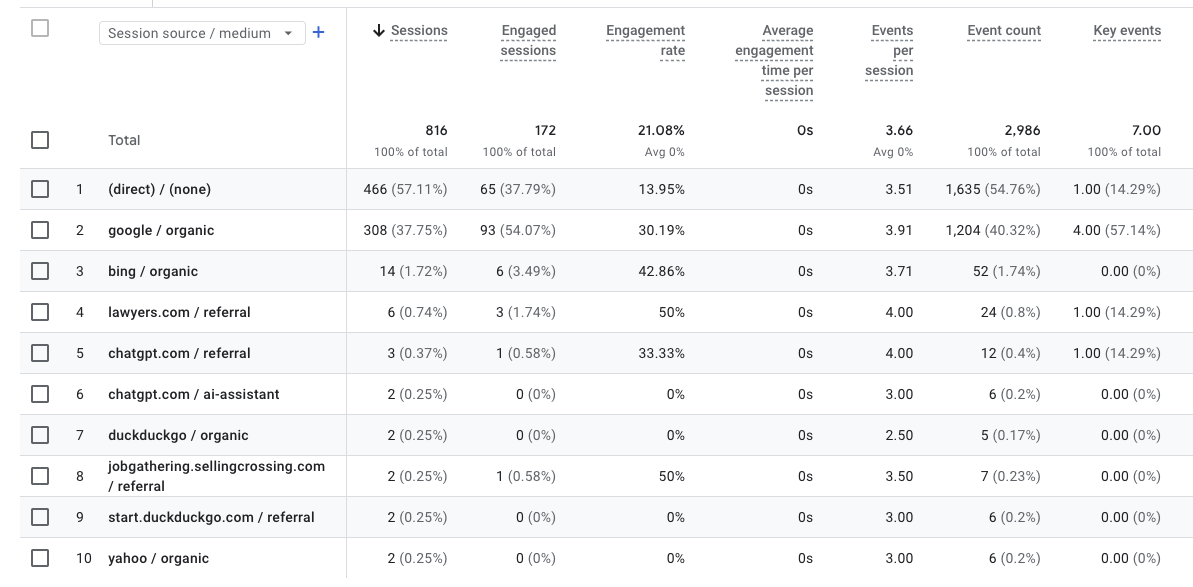
In GA4: Reports → Acquisition → Traffic acquisition, change the primary dimension to Session source / medium, and search the table for these sources:
chatgpt.com
chat.openai.com
perplexity.ai
claude.ai
copilot.microsoft.com
gemini.google.com
If your site gets cited by AI assistants at all, you'll find some of these with / referral as the medium. That's your AI traffic, filed as generic referrals.
Run ezStats alongside GA4
Cookieless, real-time, with AI traffic as its own channel from day one.
Try ezStats free →Step 2: Build a custom channel group (10 minutes)
This is the proper GA4 fix:
- Admin → Data display → Channel groups
- Click Create new channel group (don't edit the default; copy it)
- Add new channel, name it
AI Assistants - Condition: Source matches regex:
.*chatgpt\.com.*|.*chat\.openai\.com.*|.*perplexity\.ai.*|.*claude\.ai.*|.*copilot\.microsoft\.com.*|.*gemini\.google\.com.*|.*you\.com.*|.*poe\.com.*
- Drag the
AI Assistantschannel above Referral so it wins the match, and save
Now in Traffic acquisition reports, switch the channel dimension to your custom group, and AI traffic appears as its own line. Custom channel groups apply to your standard reports, including historical data in those reports.
The honest limits of the GA4 approach
It works, but know what you're getting:
- You maintain the regex. New AI surfaces appear constantly; your channel definition silently goes stale
- Dark AI traffic is invisible. Some AI tools open links without a referrer, so a portion of AI visits land in Direct no matter what you do. (Every tool has this limit, including ours; nobody can classify a referrer that was never sent.)
- No per-platform trending out of the box. You'll be building explorations to compare ChatGPT vs Perplexity over time
- It tells you nothing about the other direction. Traffic measurement can't tell you whether ChatGPT mentions you at all, which is the leading indicator. Most sites are invisible to AI assistants and don't know it
The easier way (yes, this is the pitch, kept short)
ezStats classifies AI assistant traffic as a first-class channel by default. The Search Everywhere report splits every visit across traditional search, social, video, and AI, with each AI platform broken out (ChatGPT, Claude, Perplexity, Copilot), no regex to maintain. And it covers the other direction too: AI visibility tracking monitors whether ChatGPT, Claude, Gemini, and Perplexity actually mention and cite your brand, so you can connect the answers to the visits they send.
To be fair to the alternatives: Plausible also surfaces AI tools among traffic sources now, and the GA4 recipe above is genuinely fine if you're staying put. The gap is the visibility half, which traffic analytics alone can't see.
Quickest way to check where you stand: run the free, no-login AI Visibility Score on your site. It takes a minute and tells you whether the assistants can see you at all. And since ezStats is a one-snippet install, the lowest-commitment next step is simply running it alongside GA4 for a week and comparing what each shows you.
FAQ
Does GA4 track ChatGPT traffic? GA4 records it but files it under the Referral channel with source chatgpt.com. There's no AI channel by default; you must build a custom channel group to see AI traffic as its own line.
How do I see AI traffic in Google Analytics? Create a custom channel group (Admin → Data display → Channel groups) with a channel matching sources like chatgpt.com, perplexity.ai, claude.ai, copilot.microsoft.com, and gemini.google.com via regex, placed above Referral in the evaluation order.
How much traffic do AI assistants actually send? It varies widely by niche. On one B2B site on the ezStats platform (Jan-Jun 2026), AI platforms produced 8% of classified search traffic, led by ChatGPT. It's typically the smallest channel on the chart and the fastest-growing one.
Why does some AI traffic show up as Direct? Some AI tools and in-app browsers open links without sending a referrer header. Those visits can't be attributed to the AI source by any analytics tool and land in Direct. Measured AI traffic is therefore a floor, not a ceiling.
What's the difference between AI traffic tracking and AI visibility? AI traffic tracking measures visits arriving from AI tools (lagging indicator). AI visibility measures whether AI assistants mention and cite your brand in their answers (leading indicator). You can have zero AI traffic simply because the assistants never mention you, which is the thing to fix first.
Which analytics tools show AI traffic without setup? ezStats classifies AI assistant traffic as a default channel with per-platform breakdown, and Plausible shows AI tools among its sources. In GA4 it requires the custom channel group described above.
Run ezStats alongside GA4
Cookieless, real-time, with AI traffic as its own channel from day one.
Try ezStats free →