
How ezStats Turned a Lovable-Built React Site From AI-Invisible to AI-Readable
An engineering case study on making a Vite + React SPA readable by AI crawlers without rebuilding it. AI Score went from 65 to 92.
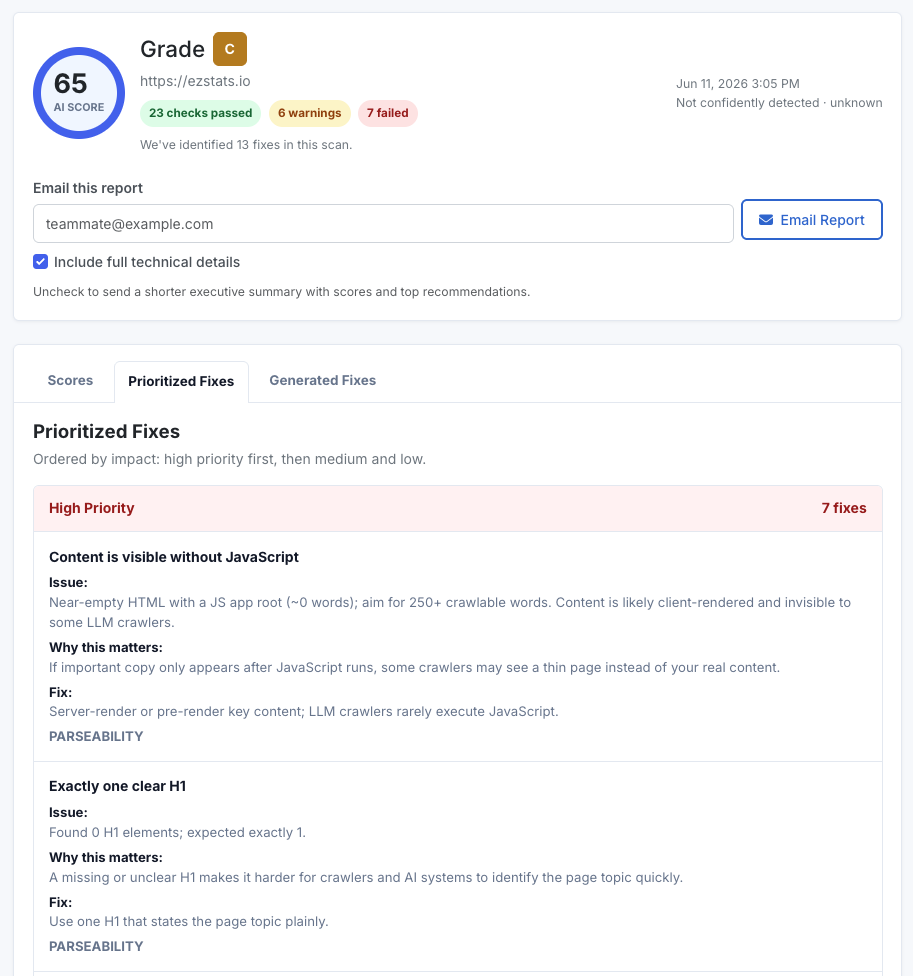
Before: AI Score 65 (grade C), 7 failed checks, ~0 words in raw HTML. After: AI Score 92 (grade A), 0 failed checks, ~1,516 words in raw HTML. Fix: Prerendered our Vite + React SPA at build time.
After adding prerendering, our AI Score moved from 65 to 92, failed checks dropped from 7 to 0, and raw HTML parseability jumped from 11/100 to 91/100. The rest of this post is how we got there, including the approaches that did not work.
This walkthrough is for teams using Lovable-exported React apps, Vite SPAs, or similar client-rendered sites that deploy as static builds.
The AI Score found a real issue
We ran our own site, ezstats.io, through our AI Score scan and got a mediocre grade. The headline issue was blunt: "Near-empty HTML with a JS app root (~0 words). Content is likely client-rendered and invisible to some LLM crawlers."
In other words, the page that humans saw was full of content, but the page that crawlers fetched was nearly blank. Several of the failed checks all traced back to this one root cause:
- Content not visible without JavaScript
- No detectable H1 or headed sections
- ~0 words present in raw HTML
- Thin topical depth
- No scannable lists or tables found
None of those were really separate problems. They were all symptoms of the same thing: the raw HTML shipped almost nothing, and everything appeared only after JavaScript ran.
Check your AI Visibility Score
See how often ChatGPT, Claude, and Perplexity mention your brand. Free, no login.
Get your free score →Why this mattered
This is exactly why we built the ezStats AI Score. A site can look finished, load quickly, rank decently in Google, and still be largely unreadable to crawlers that do not execute JavaScript. The score is not meant to be a vanity grade. It is meant to surface the implementation issues that decide whether answer engines can actually understand and cite your site.
A normal SEO audit might report "missing H1" or "thin content" as five separate line items. The more useful insight is the one underneath them: those five failures were a single implementation problem. Our SPA shipped empty HTML. Fixing the cause cleared all five at once.
This is not only about AI. The same fix improves resilience for any crawler, scraper, preview generator, accessibility tool, or audit system that relies primarily on the initial HTML.
Why this happens with Lovable (and most React SPAs)
Our site was built in Lovable, which produces a Vite + React single-page application. That stack renders the entire page in the browser. The HTML the server sends is essentially a shell:
<div id="root"></div>
<script src="/assets/index.js"></script>
Google can often execute JavaScript and eventually see the content. Many AI crawlers, bots, and lightweight fetchers either do not execute JavaScript reliably or do not wait long enough for client-rendered content to become available. They fetch the raw HTML, find an empty <div id="root">, and move on. If you want the best chance of being quoted, cited, or indexed by answer engines, your core content should exist in the HTML before JavaScript runs.
The fix for this class of problem is some form of prerendering or server-side rendering: generating real HTML for each page at build time so crawlers get the full content immediately, while real users still get the interactive app.
This is a recognizable modern problem. If your site is built with Lovable, Vite, React, client-rendered embeds, or another JavaScript-heavy setup, "looks good in the browser" does not guarantee "readable by AI crawlers."
How our site ships
For context, here is the pipeline. We edit in Lovable, which syncs to a GitHub repo, and a push triggers a build that deploys to our host. The important thing is where the fix lives: entirely inside the build step.
Edit (Lovable) → Sync (GitHub) → Build (npm run build with vite-prerender-plugin) → Deploy (static host)
Because the fix lives in the build step, the host is interchangeable. The same general approach should work on Render, Railway, Netlify, Cloudflare Pages, or any plain static host that runs a normal build step. We happen to deploy on DigitalOcean App Platform, but nothing here is specific to it.
What we tried and skipped
We tried several approaches before landing on one that built cleanly on our stack (Lovable export, GitHub, and a buildpack-based host, DigitalOcean App Platform in our case). Documenting the dead ends because they each looked reasonable and each failed for an instructive reason.
vite-plugin-prerender — In our project, this failed immediately with ReferenceError: require is not defined in ES module scope. The package uses CommonJS internals that did not load in our modern ESM Vite config.
@prerenderer/vite-plugin — At the time we tried it, this returned a 404 on install. A reminder to verify a package is current before building around it.
react-snap — Installed fine and needs zero config changes, but it drives a real headless Chrome via Puppeteer. On a buildpack host like DigitalOcean App Platform, Chrome could not launch because the environment was missing system libraries:
error while loading shared libraries: libX11-xcb.so.1:
cannot open shared object file: No such file or directory
This can happen in minimal build environments unless the required browser and system libraries are installed. The broader lesson: anything that drives a real browser at build time adds an OS-level dependency your deploy environment has to satisfy. You can fix it with a Dockerfile that installs the Chrome dependencies, or by moving prerendering into a CI step like GitHub Actions, but both add moving parts. We wanted something self-contained.
We also considered a Cloudflare Worker. A Worker cannot render a React app on its own. To do so it would need Cloudflare's Browser Rendering API, which is headless Chrome as a metered service, putting us right back at the dependency we were trying to avoid. Workers are good for injecting headers or meta into already-rendered HTML, not for generating page content.
What worked: vite-prerender-plugin
The solution that built on the first clean attempt was vite-prerender-plugin, maintained by the Preact team and usable with any framework including React. The reason it fits a constrained buildpack is simple: it renders in pure Node using react-dom/server, with no browser involved. No Chrome, no system libraries, nothing to install at the OS level.
The tradeoff is that you write a small prerender entry file and, if your router is baked into your app, you refactor it slightly. Here is the complete working setup.
Step 1: Install
npm install vite-prerender-plugin --save-dev
Step 2: Configure Vite
import { defineConfig } from "vite";
import react from "@vitejs/plugin-react-swc";
import path from "path";
import { componentTagger } from "lovable-tagger";
import { vitePrerenderPlugin } from "vite-prerender-plugin";

export default defineConfig(({ mode }) => ({
  server: { host: "::", port: 8080 },
  publicDir: "public",
  plugins: [
    react(),
    mode === "development" && componentTagger(),
    vitePrerenderPlugin({
      renderTarget: "#root",
      prerenderScript: path.resolve(__dirname, "src/prerender.tsx"),
    }),
  ].filter(Boolean),
  resolve: {
    alias: {
      "@": path.resolve(__dirname, "./src"),
    },
  },
}));
renderTarget must match the element your app mounts into. prerenderScript points at the entry file from Step 4.
Step 3: Hydrate instead of replacing the prerendered HTML
The client entry needs to hydrate the existing prerendered markup rather than throw it away and re-render from scratch.
// src/main.tsx
import { createRoot, hydrateRoot } from "react-dom/client";
import App from "./App.tsx";
import "./index.css";

const container = document.getElementById("root")!;

if (container.hasChildNodes()) {
  hydrateRoot(container, <App />);
} else {
  createRoot(container).render(<App />);
}
In production, prerendered pages should hydrate. The fallback path is there for local or dev runs and for any route that was not prerendered.
If hydration warnings appear, check for components that render differently in Node and the browser, especially anything that depends on window, dates, random values, viewport size, or local storage during initial render.
Step 4: Split the router off the app
This was the part specific to our setup and the most likely thing others will need to adapt. Our App.tsx had <BrowserRouter> baked in. BrowserRouter reads window.location, which does not exist in Node, so it cannot prerender.
The fix is to separate the providers and routes from the router itself, so the same route tree can run under BrowserRouter in the browser and StaticRouter during prerender.
// src/App.tsx (abridged)
import type { ReactNode } from "react";
import { BrowserRouter, Routes, Route } from "react-router-dom";
// ...page imports...

// Every prerenderable path. Add new pages here AND in the routes below.
export const ROUTES = [
  "/",
  "/features",
  "/docs",
  // ...the rest of your routes...
];

export const AppProviders = ({ children }: { children: ReactNode }) => (
  <QueryClientProvider client={queryClient}>
    <TooltipProvider>
      <Toaster />
      <Sonner />
      {children}
    </TooltipProvider>
  </QueryClientProvider>
);

export const AppRoutes = () => (
  <>
    <ScrollToTop />
    <Routes>{/* all your <Route> entries */}</Routes>
  </>
);

const App = () => (
  <AppProviders>
    <BrowserRouter>
      <AppRoutes />
    </BrowserRouter>
  </AppProviders>
);

export default App;
Step 5: The prerender entry
This is the file the plugin calls for each route. It receives data.url (the current path), renders the app at that URL with StaticRouter, and returns the HTML plus the full list of links to prerender.
// src/prerender.tsx
import { renderToString } from "react-dom/server";
import { StaticRouter } from "react-router-dom/server";
import { AppProviders, AppRoutes, ROUTES } from "./App";

export async function prerender(data: { url?: string }) {
  const url = data?.url || "/";

  const html = renderToString(
    <AppProviders>
      <StaticRouter location={url}>
        <AppRoutes />
      </StaticRouter>
    </AppProviders>
  );

  return {
    html,
    links: new Set(ROUTES),
  };
}
Returning the full ROUTES set on every render guarantees every page gets prerendered, rather than relying only on link crawling.
Step 6: The gotcha that cost two builds
With everything wired up, the build got all the way into prerendering and then failed with:
ReferenceError: document is not defined
> node_modules/decode-named-character-reference/index.dom.js
This is a markdown-toolchain dependency (it comes in through react-markdown / remark). It ships a browser build that calls document.createElement at import time. Vite bundled that browser build, and the prerender step ran it in Node where document does not exist.
The package also ships a Node-safe build, so the fix is to point Vite at that one. Our first attempt aliased to the package subpath and failed, because the package uses an exports map that does not expose that subpath (Missing "./index.js" specifier). The working fix is to alias to the absolute file path on disk, which bypasses the exports gate entirely:
resolve: {
  alias: {
    "@": path.resolve(__dirname, "./src"),
    "decode-named-character-reference": path.resolve(
      __dirname,
      "node_modules/decode-named-character-reference/index.js"
    ),
  },
}
The Node build works in browsers too, so this does not affect the live site. If a different browser-conditional dependency throws the same document is not defined error, the same absolute-path alias trick applies to it.
Step 7: Clean up
If you tried react-snap first, remove its postbuild script and config block from package.json, or the build will fail with react-snap: not found even after the prerender succeeds.
Verification
The build log told the first half of the story:
✓ built in 5.23s
Prerendered 23 pages:
  /
  /features
  /docs
  ...
Every route now ships real HTML. To check it yourself, open the live site, right-click, and choose View Page Source (not Inspect, which shows the post-JavaScript DOM). The raw source now contains actual headings and body copy instead of an empty <div id="root">.
The scan told the second half. We re-ran the same AI Score that flagged the problem in the first place:
| Check | Before | After |
|---|---|---|
| Overall AI Score | 65 (grade C) | 92 (grade A) |
| Failed checks | 7 | 0 |
| Parseability | 11 / 100 | 91 / 100 |
| Topic clarity | 37 / 100 | 100 / 100 |
| Search & AI Overview readiness | 83 / 100 | 100 / 100 |
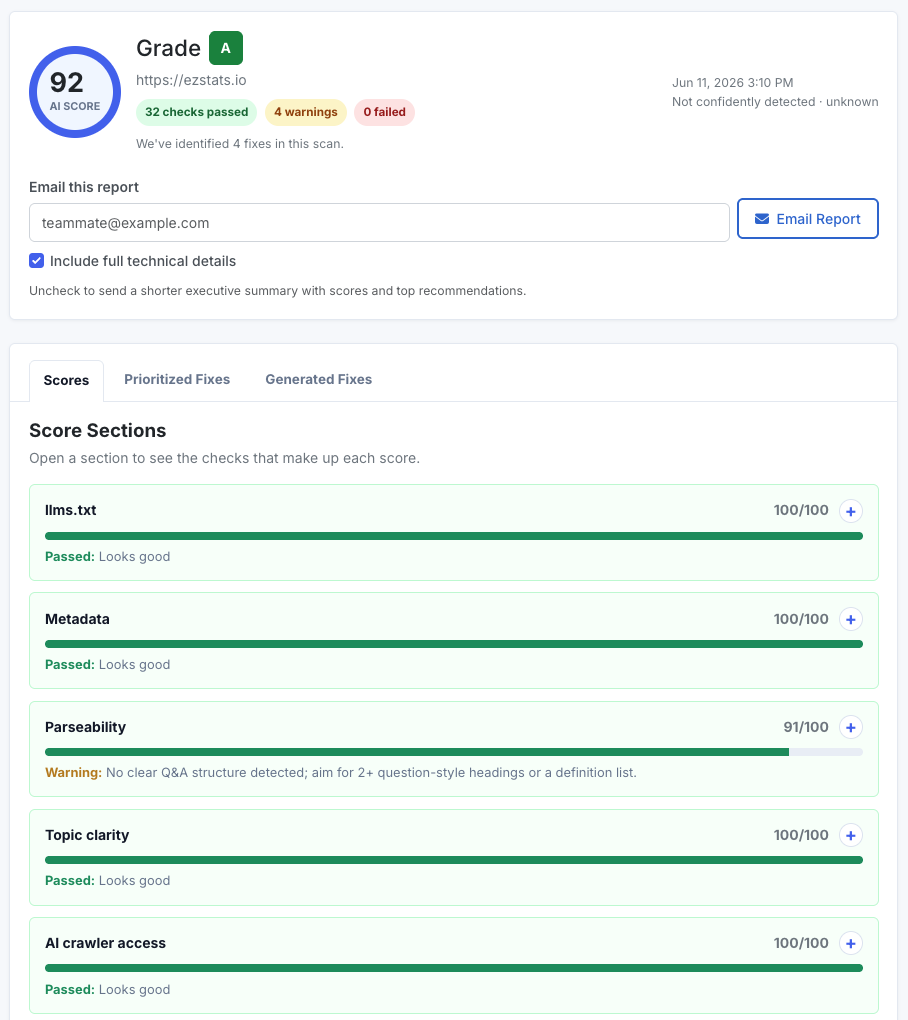
The parseability jump is the one that matters most. The scan went from "Near-empty HTML with a JS app root (~0 words)" to "Site is readable without JavaScript: ~1,516 words present in raw HTML." Topic clarity followed for the same reason: once the body copy shipped in the HTML, the thin-content flags cleared on their own. A single root-cause fix moved five separate checks at once.
The only items left are warnings rather than failures, and none relate to prerendering: adding a second schema type, exposing a visible publish or update date, and adding a Q&A or FAQ structure. Those are straightforward content changes for another day.
Key takeaways
- A blank raw HTML page is not reliably visible to many AI crawlers, even if it looks fine to humans and eventually renders for Google. For the best chance of being cited by answer engines, your core content should exist in the HTML before JavaScript runs.
- Browser-based prerenderers fight minimal deploy environments. Anything built on Puppeteer or headless Chrome will struggle on a buildpack container without extra OS dependencies. A Node-based renderer sidesteps the entire problem.
- For a Vite + React SPA,
vite-prerender-pluginis a low-infrastructure fix. It renders withreact-dom/server, needs no browser, and builds on a stock buildpack. - Hardcoded
BrowserRouteris the usual blocker. Splitting routes from the router so the tree can run underStaticRouteris the main code change for most SPAs. - Watch for
document is not definedfrom transitive dependencies. Markdown libraries are common offenders. Alias the offending package to its Node build using an absolute path.
The whole change was a handful of files and no new infrastructure. The site stays a normal interactive React app for users, and now serves complete HTML to everything that fetches it.
Maintenance note
The one ongoing cost: when you add a new page, add its path to both the <Routes> block and the ROUTES array so it gets prerendered. That is the small price for keeping everything inside the existing build with no external services.
Check your AI Visibility Score
See how often ChatGPT, Claude, and Perplexity mention your brand. Free, no login.
Get your free score →